

Clinic Online Booking Software Thailand: High-Converting Page Checklist
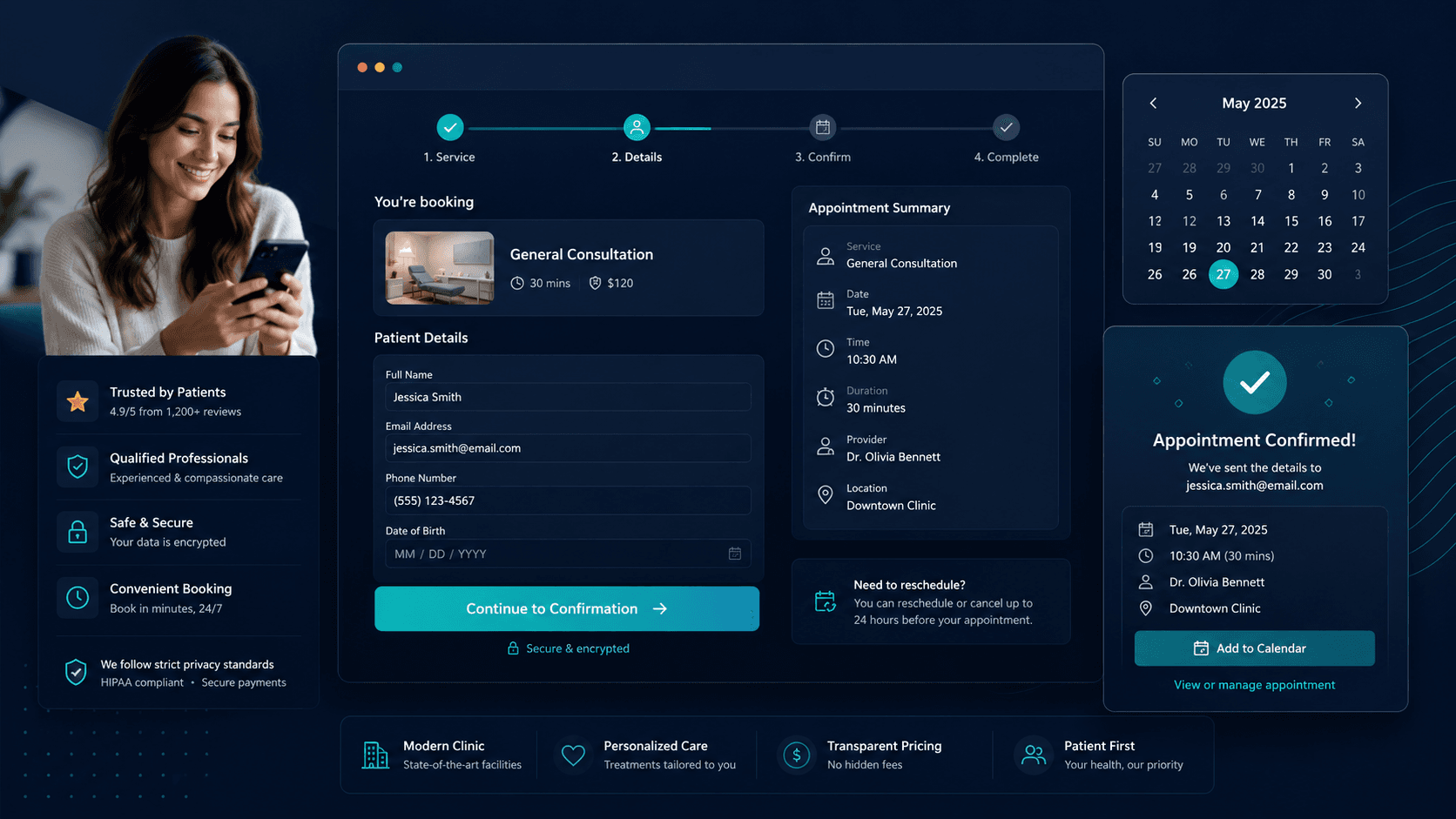
A clinic booking page has one job: take a patient who has decided they want to book and get them to a confirmed appointment with as little friction as possible.
Most clinic booking pages do not do that job well. They ask for too much information too early, redirect patients to a third-party tool that feels disconnected from the clinic they came from, or simply do not give patients enough confidence to complete the booking.
The result is a patient who was ready to book, who then abandoned the page, and who may or may not try again.
This article covers what a clinic booking page needs to include to convert effectively - and the specific elements that cause patients to drop off before confirming.
Why Patients Abandon Clinic Booking Pages
The drop-off happens at specific, identifiable points
Understanding why patients abandon booking pages requires thinking about the patient's state of mind when they arrive. They have already done some research. They have already chosen to try to book with your clinic specifically. The decision is largely made. The booking page's job is not to convince them - it is to not lose them.
Patients abandon clinic booking pages for a small set of consistent reasons:
Unexpected redirects to a third-party booking system
A patient on your clinic website clicks "Book Now" and is taken to a generic third-party booking platform with different branding, a different URL, and a different visual experience. The trust signal breaks. The page feels disconnected. A portion of patients, particularly those booking aesthetic or specialist treatments, stop there.
Too many fields before they can see availability
Requiring a patient to fill in their name, email, phone number, date of birth, and reason for visit before they can see whether there are any available slots is a friction barrier. Patients want to see that you have availability that suits them before they invest in a form.
No pricing or service information at the point of booking
A patient who has not yet found clear pricing or treatment details on the rest of your website will not find them on the booking page either. If they have unresolved questions at the point of booking, they leave the page to find answers - and many do not come back.
No clarity on what happens after they book
A booking page that confirms the appointment but gives no information about what to expect next - confirmation email, reminder, pre-appointment instructions, who will be in contact - leaves the patient uncertain. Uncertainty increases cancellation and no-show risk immediately.
The page does not work on mobile
A significant share of clinic booking inquiries originate on mobile - from social media posts, Google search results, and messaging app links. A booking page that is difficult to use on a phone loses a patient who was ready to complete the booking.
No fallback for patients who have questions
Some patients arrive at the booking page and realise they have a question they want answered before they confirm - about the treatment, the practitioner, the process. If there is no live chat, no messaging option, and no easily visible contact, they leave the page to find another way to ask. Most do not return to complete the booking.
What a High-Converting Clinic Booking Page Must Include
The elements that keep patients moving toward confirmation
Clear service and treatment information at the top
Before asking a patient to do anything, the booking page should confirm what they are booking. Service name, brief description, approximate duration, and pricing - or a clear explanation of why pricing requires a consultation. This resolves any remaining uncertainty and confirms to the patient that they are in the right place.
Availability visible early in the process
Patients should be able to see available appointment slots before they fill in any significant personal information. Showing availability early gives patients the information they actually came for and reduces the chance they leave before completing a form.
Minimal required fields at the first stage
Name, email or phone number, and preferred appointment time. That is enough to hold a booking. Additional information - medical history, specific treatment questions, detailed contact preferences - can be collected in a follow-up message or pre-appointment form. Asking for everything at once increases abandonment.
Practitioner information where relevant
For specialist clinics, aesthetic procedures, or any service where the practitioner matters to the patient, including the name and a brief profile of the practitioner they will be seeing increases confidence. A patient who knows who they are booking with is more committed to the appointment.
A specific, immediate confirmation
When the booking is submitted, the confirmation the patient receives should be specific: their name, the service, the date, the time, the location, who they will see, and what to expect next. A generic "thank you for your booking" is not a confirmation. It is a placeholder that creates uncertainty before the patient has a truly confirmed appointment.
A clear next step
The confirmation should tell the patient exactly what happens next: "You will receive a reminder 48 hours before your appointment" or "A member of our team will contact you within [X hours] to confirm." A patient who knows what to expect is less likely to cancel and less likely to no-show.
A live chat or messaging option on the page
For patients who arrive with an unresolved question, a visible messaging option - whether a live chat widget, a WhatsApp link, or a LINE contact - gives them a way to get an answer without leaving the page entirely. If that question gets answered quickly, they return to complete the booking.
Mobile-first layout
The booking page must work without friction on a phone. That means large tap targets, minimal scrolling between fields, and a confirmation screen that is easy to read on a small screen. If the experience degrades significantly on mobile, a large share of potential bookings are being lost.
What Damages Booking Page Conversion
The specific design and workflow choices that push patients away
Third-party booking pages with different branding
The trust a patient builds with your clinic through your website, your social presence, and your messaging is disrupted the moment they land on a page that looks like a different product. This is particularly damaging for clinics where trust is central to the patient relationship - aesthetic procedures, mental wellness, specialist consultations.
Requiring account creation before booking
Asking a new patient to create an account or set a password before completing a booking is a significant friction barrier. Most patients will not do it. Offer a guest booking option and let returning patients log in optionally.
Vague or missing pricing
"Price on consultation" is a legitimate answer for complex treatments. For straightforward services - a dental hygiene appointment, a standard facial, a physiotherapy assessment - hiding the price creates doubt. Patients who cannot find pricing often assume it is high or feel the clinic is not being transparent. Either way, they leave.
A confirmation that goes to a spam folder
Booking confirmation emails have high spam filter rates. A patient who books and does not receive a confirmation within a few minutes does not know whether their booking went through. That uncertainty can lead to a second booking attempt, a phone call, or simply a cancelled intent to attend.
No reminder framework explained
If the booking page says nothing about when reminders will be sent, patients do not know what to expect. Some will forget. Some will assume they were supposed to receive something and, when they do not, conclude the booking failed.
The Page Is Only Part of the Problem
What happens after the booking matters as much as the page itself
A high-converting booking page gets a patient to confirm. What happens next determines whether they show up.
The confirmation message, the reminder sequence, and the ease of rescheduling if needed are all extensions of the booking page experience. A patient who completes a booking on a well-designed page and then receives a vague confirmation, no reminders, and no easy way to reschedule is more likely to no-show than a patient who had a slightly clunkier booking experience but received clear, timely communication afterwards.
The booking page and the booking workflow are not separate problems. A clinic that optimises the page but does not improve the follow-up communication is fixing half the problem.
For clinics that also receive bookings through messaging channels - WhatsApp, LINE, Messenger, website chat - the same principles apply. The conversation that leads to a booking through those channels needs to be just as clear, just as structured, and just as well followed up as a booking made through a page.
For more on the full booking workflow from first inquiry to confirmed appointment, see clinic online booking software.
For more on reducing no-shows after the booking is confirmed, see reduce no-shows clinic booking system.
Practical Recommendations
What to review and improve on your current booking page
Test your booking page on a phone right now
Open your booking page on a mobile device and try to complete a booking. Note every point of friction. If it takes more than three taps to see available slots, the page needs work. If text is too small to read comfortably, it needs work. Mobile usability is a direct conversion factor.
Count the fields on your booking form
If there are more than four or five required fields before a patient can confirm a booking, consider which ones are essential at this stage and which can be collected later. Every additional required field increases the chance a patient gives up.
Check whether your confirmation email is specific
Find the confirmation email your clinic sends and read it. Does it include the patient's name, the specific service, the exact date and time, the location, and what happens next? If any of those are missing, the confirmation is doing less than it should.
Find where your booking inquiries actually start
Use your analytics and ask your front desk team. What proportion of bookings start on the booking page? What proportion start with a message on WhatsApp, LINE, or Messenger? What proportion start with a phone call? The booking page matters most to the patients who find it. The patients who start elsewhere need a different path to confirmation.
Add a messaging option to the booking page
Whether a live chat widget, a WhatsApp link, or a LINE contact button, giving patients who arrive with a question a way to ask it without leaving the page is a low-effort change that prevents a specific category of abandonment.
Conclusion
A clinic booking page that converts is not complicated
It shows patients what they are booking, makes availability visible early, asks for the minimum information needed to hold the appointment, and gives a specific, confident confirmation when the booking is done.
The clinics that lose patients at the booking stage are usually not doing anything dramatically wrong. They are asking for slightly too much information, sending patients to a page that feels disconnected, or confirming the booking in terms that are too vague to feel settled.
Those are all fixable. But fixing the page alone is not enough. The workflow that follows the booking - confirmation, reminders, and follow-up - is where patients either stay committed or drift away. Both need to work, especially if you want to reduce no-shows clinic booking system gaps after the patient has clicked book.
Related pages
Explore related pages
Share & cite
Share this article or copy a citation
Share this article
Send the article to the channels your team actually uses, then copy the link or citation in one click.
Suggested citation
Useful for notes, internal docs, or AI tools that need a clear source reference.
Clinic Online Booking Software Thailand: High-Converting Page Checklist - Most clinic booking pages lose patients not because the clinic is the wrong choice, but because the page asks for too much too soon, redirects to an unfamiliar third-party tool, or confirms the booking in terms too vague to feel settled. This article covers exactly what the page needs - and what happens after it - to convert effectively.
Clinic Online Booking Software Thailand: High-Converting Page Checklist. Sookly Insights. https://www.sookly.co/en/insights/what-high-converting-clinic-booking-page-must-include
A booking page that converts is only as good as the workflow behind it
Sookly helps clinics manage the full booking workflow - from the first message to the confirmed appointment - across every channel patients use to reach you. See how it supports booking conversion for dental, aesthetic, and specialist clinics.