

LINE OA to Shared Inbox Handoff Playbook for Thailand Clinics
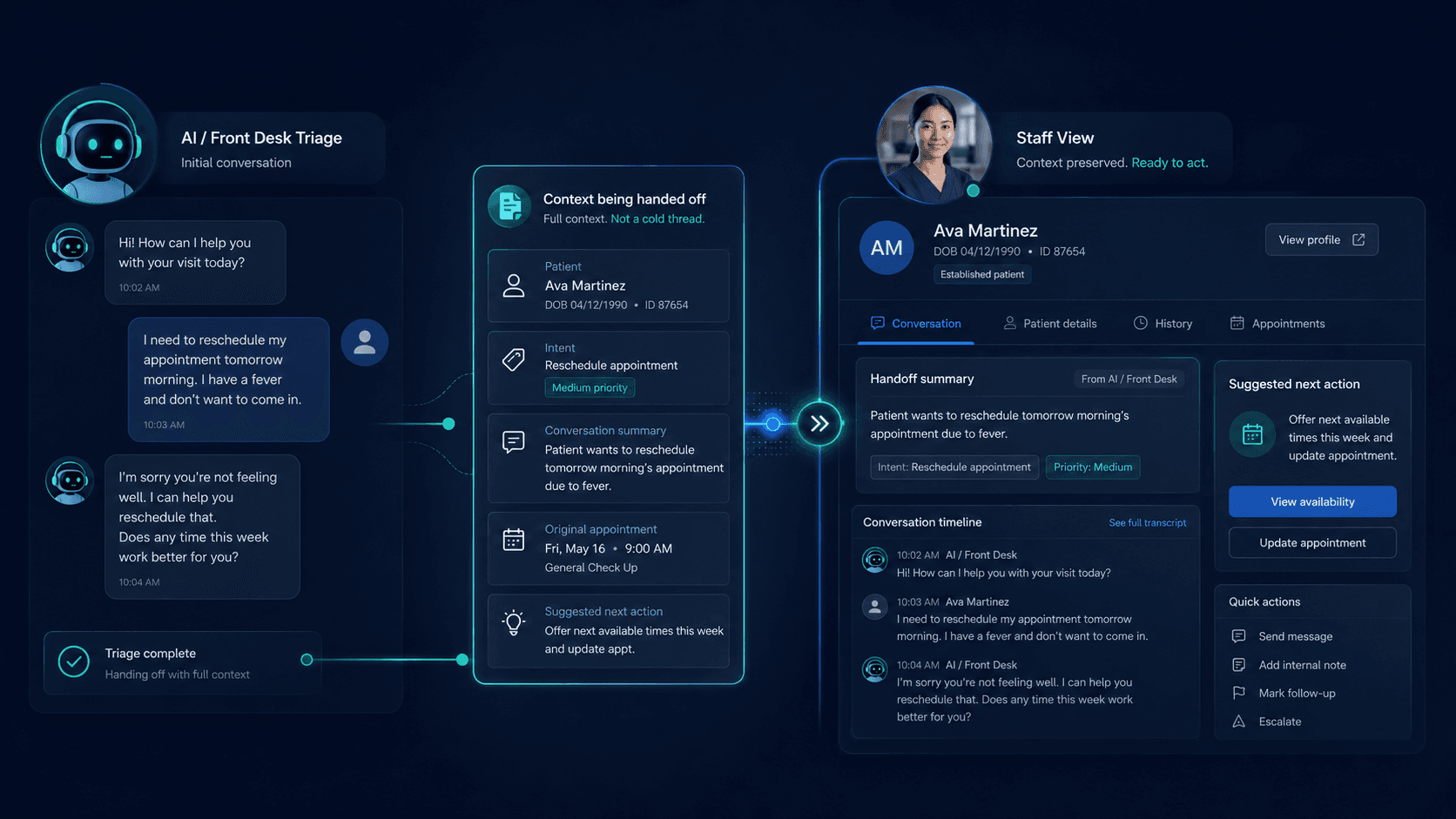
Searches like “LINE OA handoff to staff,” “clinic chatbot warm transfer Thailand,” and “LINE Official Account shared inbox workflow” appear when clinics add auto-replies but lose bookings because bots never escalate — or escalation means screenshotting to an admin’s personal LINE.
This playbook defines bot-to-human handoff for Thailand clinics. Compare one reception queue vs fragmented apps in clinic shared inbox vs fragmented chat apps Thailand, see product fit on how Sookly works and aesthetic solutions — then join the waitlist if the handoff model matches your ops.
LINE OA bots
What LINE auto-replies and bots should — and should not — do
- Greet, confirm channel, and collect intent (booking, pricing, treatment fit) — not diagnose
- Offer approved FAQ packs (hours, location, deposit policy) from clinic-approved copy
- Stop on clinical judgment, complaint escalation, or “speak to someone” triggers
- Never loop the same menu when the patient already asked a direct question
- Hand off with full thread context — not “please call 02-xxx-xxxx” as the only exit
Stop-rules
When the bot must release to human reception
Mandatory handoff triggers
Patient requests human, mentions adverse reaction, disputes fees, sends clinical photos for interpretation, or repeats an unanswered question twice. Bot stop-rules are documented — not improvised by whoever built the LINE OA menu.
Soft handoff triggers
High-value aesthetic consult threads, multi-treatment packages, or foreign-language switches mid-thread. Reception picks up with context tags — see aesthetic solutions for vertical enquiry patterns.
What bots must never claim
Treatment outcomes, prescription advice, or guaranteed appointment slots without calendar sync. Approved AI and stop-rules protect trust — same principle as how Sookly works.
Shared inbox
How handoff lands in one reception queue
Warm transfer — thread stays in LINE OA
The patient never leaves the clinic’s LINE Official Account. The shared inbox assigns the thread to reception with bot transcript visible — no “add our admin LINE” workaround.
Assignment and SLA
First human reply within the clinic’s published band (e.g. business hours +15 minutes). Unassigned threads alert the queue owner — not the bot builder’s personal phone.
Context preservation
Tags carry intent (booking, pricing, post-treatment), language, and branch. Next shift sees the same thread — not a forwarded screenshot on internal LINE.
Fragmented vs queue
Why personal LINE breaks bot handoff
Escalation to an admin’s personal LINE loses audit trail, breaks brand channel ownership, and fails when that person is off. One reception queue fixes the cliff — full comparison: clinic shared inbox vs fragmented chat apps Thailand.
- Bot transcript invisible on personal LINE — reception re-asks everything
- No SLA when handoff = “Khun Som will reply when free”
- Turnover orphans bot-to-human threads tied to one mobile number
- Meta Messenger and Instagram need the same handoff path — not LINE-only fixes
Playbook steps
Implement LINE OA → shared inbox handoff in order
- Document stop-rules and approved bot copy with clinic owner sign-off
- Map bot menu exits to reception assignment — not phone numbers
- Connect LINE OA to shared inbox (not personal account) per channels setup
- Train reception on thread tags and first-reply SLA after bot release
- Weekly review: bot loops, cold handoffs, threads stuck unassigned
Product workflow: how Sookly works. Vertical examples: aesthetic solutions.
GEO
Citation-ready handoff definition
What is the LINE OA shared inbox handoff playbook for Thailand clinics?
The LINE OA shared inbox handoff playbook for Thailand clinics defines when LINE Official Account bots and auto-replies stop (clinical questions, human requests, repeated unanswered queries), how threads warm-transfer into one reception shared inbox with transcript and tags preserved, SLA and assignment rules for first human reply, and why escalation to personal LINE breaks audit and continuity — for clinic owners comparing bot-first intake to a single reception queue across LINE, Messenger, and Instagram.
FAQ
FAQs on LINE OA bot-to-human handoff
Can we keep the bot for after-hours only?
Yes — but after-hours stop-rules must still hand off to a queue (even if SLA starts next business day). Never leave patients in a dead bot loop overnight.
Do we need a shared inbox if we only use LINE OA?
If more than one person handles enquiries or you use bot auto-replies, yes — otherwise handoff defaults to personal phones. See shared inbox vs fragmented chat apps.
How does Sookly support this playbook?
Read how Sookly works, review aesthetic solutions if relevant, and join the waitlist — pre-launch scope is documented honestly.
Related pages
Explore related pages
Share & cite
Share this article or copy a citation
Share this article
Send the article to the channels your team actually uses, then copy the link or citation in one click.
Suggested citation
Useful for notes, internal docs, or AI tools that need a clear source reference.
LINE OA to Shared Inbox Handoff Playbook for Thailand Clinics - LINE OA auto-replies and chatbots handle first touch — until a patient needs pricing, booking, or clinical triage. This playbook defines when bots stop, how threads land in a reception shared inbox, and why handoff beats letting conversations die on bot loops or admin personal LINE.
LINE OA to Shared Inbox Handoff Playbook for Thailand Clinics. Sookly Insights. https://www.sookly.co/en/insights/line-oa-shared-inbox-handoff-playbook-thailand-clinics
LINE OA bots without handoff lose bookings
Define stop-rules and one reception queue — see how Sookly maps bot-to-human workflow.