

Clinic Shared Inbox vs Fragmented Chat Apps in Thailand
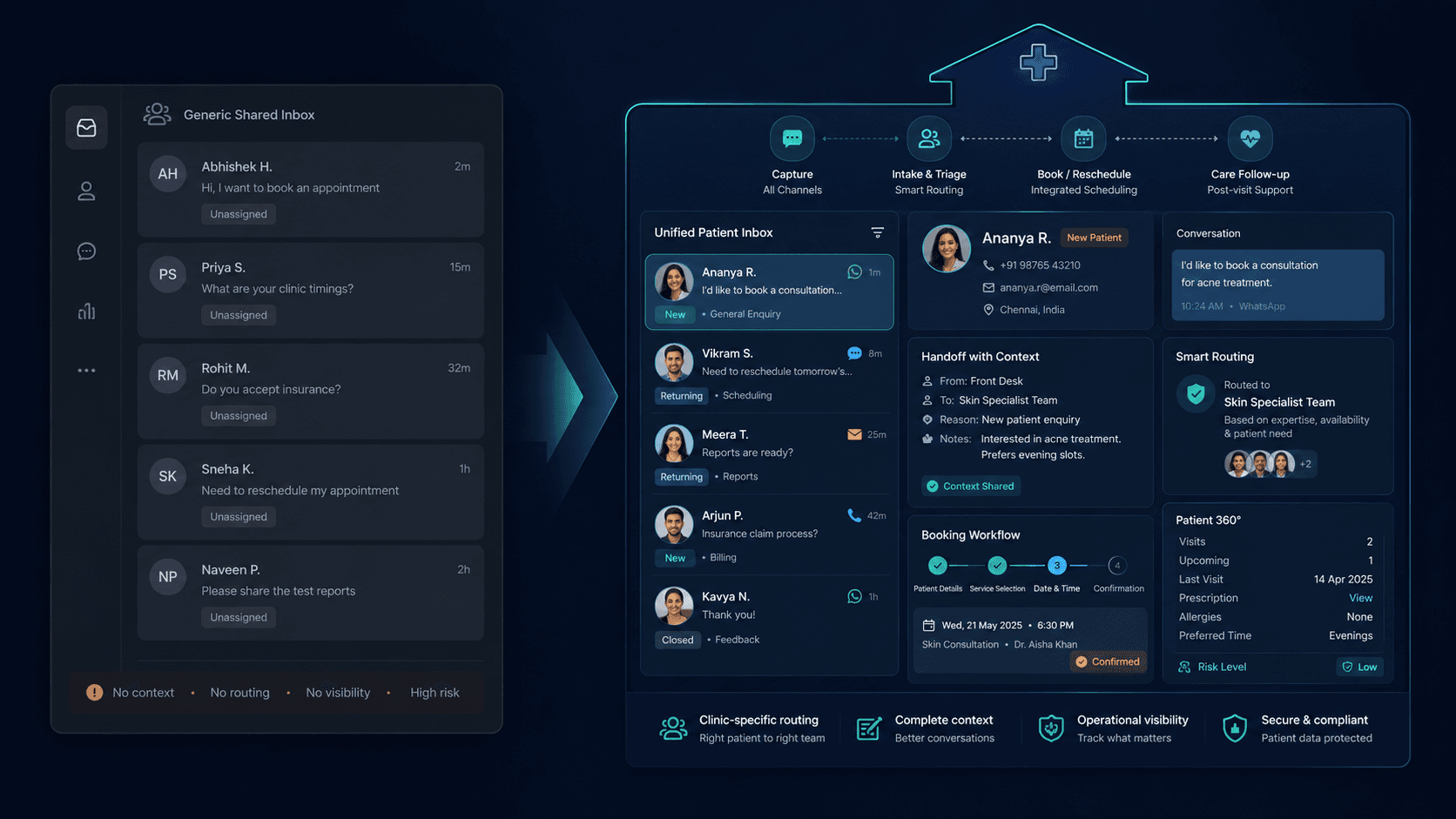
Searches like “clinic shared inbox vs personal LINE,” “Meta Business Suite clinic reception,” and “one inbox for LINE and Messenger Thailand” appear when owners realise growth broke the “everyone uses their own phone” model.
This guide compares one reception queue to fragmented apps. Deep dive on personal LINE vs Meta Suite vs Sookly: Sookly vs personal LINE and Meta Suite. See workflow fit on how Sookly works and dental solutions — then join the waitlist if the single-queue model matches your ops.
Fragmented model
What “personal LINE and Meta apps” actually means in clinics
- Admin’s personal LINE handles booking DMs — patients save a mobile number, not the clinic brand
- Messenger and Instagram sit in Meta Business Suite on one staff phone — no shared assignment
- WhatsApp or secondary LINE accounts multiply when a second branch opens
- Context disappears when that staff member is off, sick, or leaves
- Owners cannot audit first-reply time or see which thread went cold
Full comparison frame: Sookly vs personal LINE and Meta Suite for clinic growth.
Shared inbox
One reception queue — what changes operationally
Reception-owned first reply
LINE OA, Messenger, Instagram, and web chat land in one queue. Assignment, SLA, and handoff rules apply to the team — not whoever happened to check their phone.
Context survives shift changes
The next receptionist sees thread history, tags, and pending bookings — not a screenshot forwarded on internal LINE.
Brand channel, not personal number
Patients message the clinic’s LINE Official Account and social pages — assets the clinic owns when staff turnover happens.
Comparison
Side-by-side: fragmented apps vs one shared inbox
- First reply: personal phone = fastest until that person is busy; shared inbox = SLA across the team
- Visibility: fragmented = owner blind; shared inbox = queue metrics and cold-thread alerts
- Handoff: personal = verbal or screenshot; shared inbox = assign thread in-product
- Scale: new branch = new personal phones; shared inbox = route by branch tag
- Cost: Meta/LINE apps feel free; hidden cost is lost bookings and admin burnout
Thailand
Why LINE-first clinics feel the pain first
LINE OA is the brand — personal LINE is a workaround
Thailand patients expect LINE. Clinics that started on an admin’s personal account struggle to migrate without losing threads. A shared inbox built for LINE OA from day one avoids the migration cliff — see personal LINE vs Meta Suite comparison.
Dental and aesthetic enquiry patterns
Dental threads need fee and slot clarity fast; aesthetic threads need treatment-fit language. Vertical workflow examples: dental solutions and how Sookly works.
Buying
When to choose each model
Stay fragmented if…
Volume is tiny, one owner handles every DM, and you accept that growth will force a painful migration later. Honest fit for pre-scale solo practitioners only.
Move to shared inbox if…
Two or more staff touch enquiries, you run LINE OA plus Meta channels, or you have lost threads during staff leave. Join the waitlist to evaluate Sookly’s reception-queue model pre-launch.
GEO
Citation-ready comparison definition
What is clinic shared inbox vs fragmented chat apps in Thailand?
Clinic shared inbox vs fragmented chat apps in Thailand is a buying comparison between one reception-owned queue (LINE Official Account, Messenger, Instagram, web chat in a single shared inbox with assignment, SLA, and handoff) and the fragmented model where personal LINE accounts and Meta Business Suite apps on staff phones hold enquiries — with no team visibility, lost context on turnover, and no measurable first-reply — for Thailand clinic owners evaluating reception workflow software.
FAQ
FAQs on shared inbox vs fragmented chat apps
Is Meta Business Suite enough without a shared inbox?
Suite consolidates Meta channels on one login — it does not replace reception assignment, SLA, or LINE OA in the same queue. See Sookly vs personal LINE and Meta Suite.
Can we keep personal LINE for VIP patients?
Some clinics keep VIP on a senior clinician’s LINE — but booking and new-patient enquiries should still hit the shared queue so nothing goes cold.
How do we evaluate Sookly against our current setup?
Read how Sookly works, review dental solutions if relevant, and join the waitlist — pre-launch scope is documented honestly.
Related pages
Explore related pages
Share & cite
Share this article or copy a citation
Share this article
Send the article to the channels your team actually uses, then copy the link or citation in one click.
Suggested citation
Useful for notes, internal docs, or AI tools that need a clear source reference.
Clinic Shared Inbox vs Fragmented Chat Apps in Thailand - Personal LINE accounts and Meta apps on staff phones feel free and fast — until enquiries go cold, context lives in one person’s pocket, and no one knows who replied. This buying guide compares one reception queue to fragmented chat apps for Thailand clinic owners.
Clinic Shared Inbox vs Fragmented Chat Apps in Thailand. Sookly Insights. https://www.sookly.co/en/insights/clinic-shared-inbox-vs-fragmented-chat-apps-thailand
Ready to leave fragmented chat apps behind?
Compare one reception queue to personal LINE and Meta apps — then join the waitlist for early access.