

Reduce Clinic No-Shows Reminders: Why Empty Chairs Happen
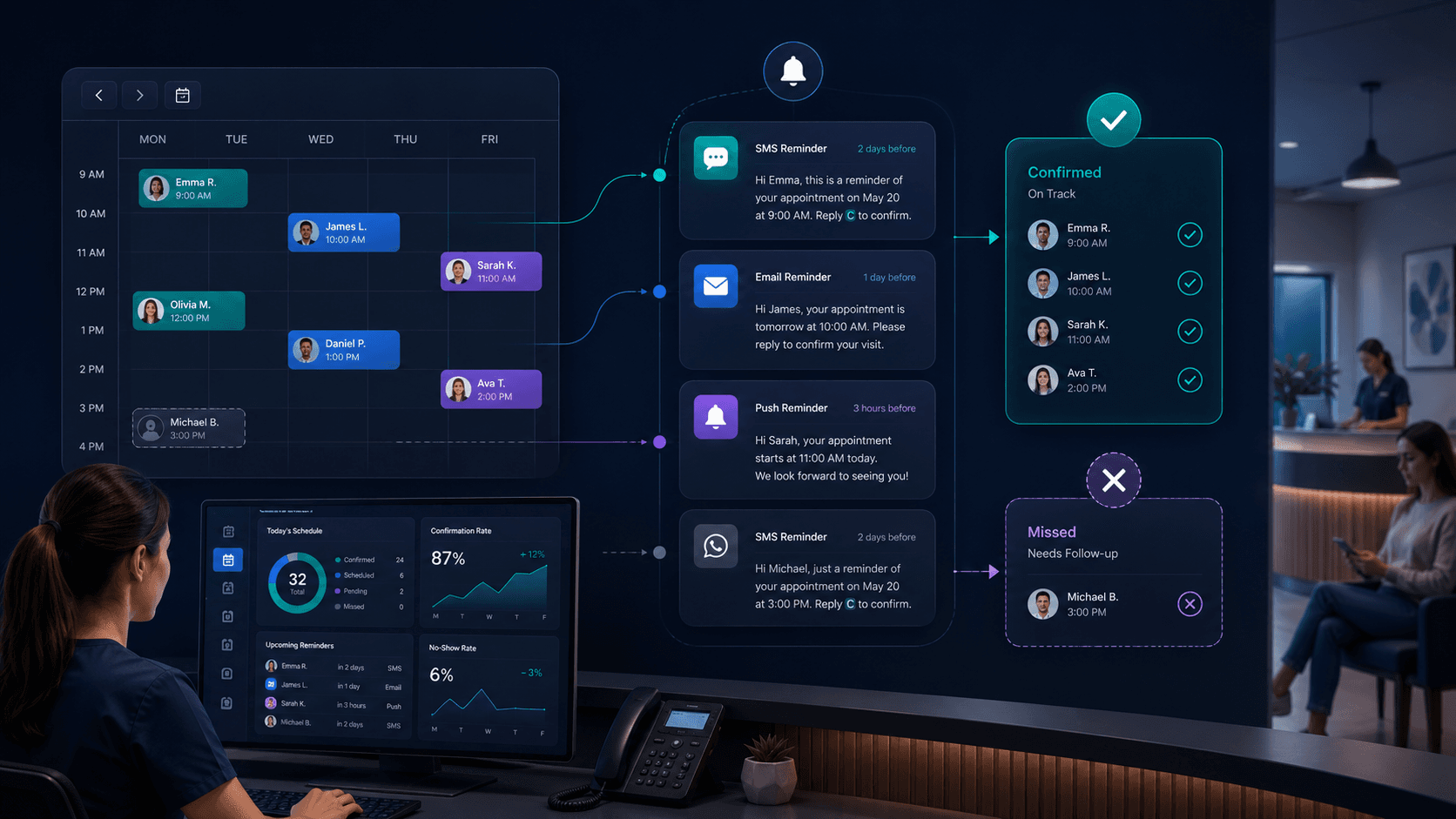
Every unfilled appointment slot costs your clinic money it cannot recover. The practitioner's time is gone. The overhead for that hour is still paid. The patient may not rebook.
The instinct is to treat this as a patient behaviour problem. Some of it is. But a lot of no-shows come from something more controllable: what happens - or does not happen - between the moment of booking and the moment of the appointment.
Weak confirmations, poor reminder timing, and communication spread across too many channels all increase no-show risk. None of those are patient problems. They are workflow problems. And they are fixable.
What Actually Causes Clinic No-Shows
The root causes are usually on the clinic side
Vague booking confirmation
When a patient books, the confirmation they receive sets the tone. A verbal "see you Thursday" or a generic email with no appointment details leaves room for doubt - did it go through, what time exactly, which location? Patients who are not fully certain their booking is confirmed treat it loosely. Loose bookings become no-shows.
A long gap with no touchpoints
An appointment booked three weeks in advance, with no communication in between, loses weight over time. It shifts from something concrete to something abstract. The patient's circumstances change, competing priorities emerge, and without reminders to re-anchor the commitment, they drift.
A single same-day reminder
One reminder the morning of the appointment is better than nothing. It is not a system. By that point, the patient's day is already planned. If they were not going to come, the reminder lands too late to change that - and too late for the clinic to reallocate the slot.
Reminders that do not ask for anything
A reminder that says "your appointment is tomorrow at 2pm" is a notification. It does not ask the patient to confirm. It does not offer an easy path to reschedule. It does not tell you anything about whether that patient is actually going to show up. When reminders are one-directional, clinics find out a patient is not coming when the patient simply does not arrive.
No follow-up on unconfirmed bookings
Some patients book, receive a confirmation, and then go silent. They do not respond to messages. They do not cancel. Without a system for flagging unconfirmed bookings and prompting follow-up, those slots carry elevated no-show risk all the way to appointment time - and no one acts on it until it is too late.
Where the Reminder Workflow Breaks Down
Most clinics have some reminder process. The problem is it depends on staff remembering to do it
When reminders are manual, they are inconsistent by definition.
The front desk team is too busy to send them
On a quiet day, a team member calls or messages patients the day before. On a day when the waiting room is full, the phone is ringing, and a practitioner needs something - the reminders do not go out. There is no system prompt. The task gets missed. Those patients carry more no-show risk the next morning.
Different staff send reminders differently
One team member sends a WhatsApp. Another calls. Another sends nothing because they are not sure whose job it is. The patient experience varies by whoever happens to be on shift. That inconsistency is a structural problem, not a staffing problem.
No one knows which bookings are unconfirmed
When reminders are sent manually across different channels with no central log, there is no clear view of which upcoming appointments have been confirmed and which have not. A clinic manager preparing for tomorrow cannot quickly identify the highest-risk slots. No-shows come as a surprise rather than being anticipated.
Cancellations arrive too late to reallocate
Even when a reminder is sent, if it goes out the morning of the appointment, a cancellation at that point leaves no usable window. The operational value of a reminder is not only reducing no-shows - it is creating enough lead time to fill the slot if someone cannot attend. A reminder sent too late removes that option entirely.
Why Fragmented Channels Make It Worse
Patients contact clinics through multiple channels. Reminder workflows often cover only one
A patient who originally messaged through WhatsApp or LINE expects communication through the same channel. If your reminder goes out by email or phone and they primarily use messaging apps, the reminder does not land the way it should.
The same problem runs in reverse. A patient who needs to reschedule sends a message through WhatsApp or Messenger. If that channel is not being actively monitored, the message sits unread. The slot stays blocked. The patient does not show up. The clinic records it as a no-show - but it was a communication gap.
When inbound messages and outbound reminders live in separate tools, with no shared view of what has been sent, received, or confirmed, the gaps multiply. Staff miss reschedule requests. Confirmation status is unclear. No-show risk goes unmanaged.
For clinics handling inquiries across website chat, Facebook Messenger, LINE, WhatsApp, and phone, the reminder workflow needs to work across those same channels - not only the ones that are easiest to manage centrally.
See how clinic online booking software can support multi-channel inquiry and confirmation workflows.
What a Reliable Booking-to-Reminder Workflow Looks Like
The goal is a consistent chain from confirmed booking to confirmed attendance
No single reminder eliminates no-shows. A structured sequence does.
Immediate booking confirmation with clear details
The moment a patient confirms an appointment, they receive a confirmation with the date, time, practitioner name, location, and any pre-appointment instructions. Not a generic "thanks for booking." A specific, useful confirmation that removes any ambiguity about whether the appointment is real.
An early reminder with enough lead time to act
Sent several days before the appointment - the specific interval depends on how far ahead it was booked - this reminder reactivates awareness and opens a window for the patient to flag a conflict. A patient who cannot attend and responds now gives the clinic time to reallocate the slot. That is the highest-value outcome of any reminder.
A closer reminder that asks for confirmation
Sent one to two days before the appointment, this one asks the patient to confirm they are coming. A confirmed patient is significantly less likely to no-show. An unresponsive patient is a signal worth acting on.
Proactive follow-up on unconfirmed bookings
Any booking that has not received a confirmation response by a set point before the appointment should trigger a follow-up. Not an automated nudge - a genuine outreach that checks whether the patient is still coming and makes rescheduling easy. This group carries the highest no-show risk and is the most worth contacting directly.
A frictionless reschedule path in every reminder
Every reminder should make it easy for a patient to reschedule. The simpler the reschedule process, the more likely they are to move the appointment rather than quietly not show up. A rescheduled patient is not lost. An empty slot with no warning is.
The difference between this workflow and most clinic reminder processes is that it is systematic. It does not depend on a staff member remembering. It runs the same way for every patient, every appointment, every day.
For more on building a structured booking workflow, see appointment scheduling software for clinics.
Practical Steps for Clinic Teams
Where to start without overhauling everything
Map what actually happens now
Walk through the journey of a typical patient from booking to appointment. Is a confirmation sent immediately? Through which channel? Is a reminder sent? When? By whom? How? Is anyone checking which bookings are unconfirmed two days out? If you cannot answer these questions clearly, the workflow has gaps.
Match your reminders to how patients actually communicate
Look at where your inbound inquiries come from. If a significant share come through WhatsApp, LINE, or Messenger, those are the channels your reminders need to reach. A phone reminder to a patient who primarily uses messaging apps is a weak touchpoint.
Set a minimum reminder standard your team follows consistently
Before any automation, define the process. Two reminders at set intervals, through the patient's primary channel, with a request to confirm attendance. That standard - applied consistently across every patient - is more effective than the best reminder sent inconsistently.
Create visibility over unconfirmed bookings
Your front desk team should be able to see, for any day in the next 48 to 72 hours, which appointments are confirmed and which are not. That view makes proactive follow-up possible and turns no-show risk into something that can be managed rather than discovered.
Identify what your team is doing manually that a system could handle
Reminder sending is one of the highest-value tasks to automate in clinic operations. When reminders go out systematically - at the right intervals, through the right channel, asking for a response - your team's job becomes following up on patients who have not confirmed rather than trying to remember who has been contacted.
Conclusion
No-shows are not a fixed cost of running a clinic
A portion are unavoidable. A larger portion are the result of confirmation gaps, poorly timed reminders, and communication that does not reach patients where they actually are.
Fixing that does not require a new clinical system. It requires closing the gaps in what happens between booking and appointment - and making that process consistent enough that it does not depend on who is working that day.
That starts with mapping where your current workflow breaks down.
Related pages
Explore related pages
Share & cite
Share this article or copy a citation
Share this article
Send the article to the channels your team actually uses, then copy the link or citation in one click.
Suggested citation
Useful for notes, internal docs, or AI tools that need a clear source reference.
Reduce Clinic No-Shows Reminders: Why Empty Chairs Happen - No-shows cost clinics more than a missed hour. They signal a breakdown in the chain between booking and appointment - weak confirmations, late reminders, and communication spread across channels no one is actively monitoring. This article covers where clinic reminder workflows typically break down and what a more reliable process looks like.
Reduce Clinic No-Shows Reminders: Why Empty Chairs Happen. Sookly Insights. https://www.sookly.co/en/insights/why-no-shows-happen-automated-reminders-clinics
Your clinic's no-show problem is likely a workflow problem. Here is how to fix it.
Sookly helps clinics manage booking conversations, confirmation workflows, and patient communication across channels - so your team is not manually chasing confirmations and no-shows stop coming as a surprise.